 SHENDZO
How to record both cameras in one video with Dual Camera
Choose a layout and save the composition to get both views in a single clip. You’ll need iOS 17 or later and an iPhone that supports simultaneous front and rear capture.
Switch to Video
Allow camera access and, if you want sound, microphone access. Select Video at the bottom of the camera screen.
Place both views in the frame
Open the layout control at the top. In Top / bottom, each view gets half the frame. If you choose the circular inset, drag it to the spot you want.
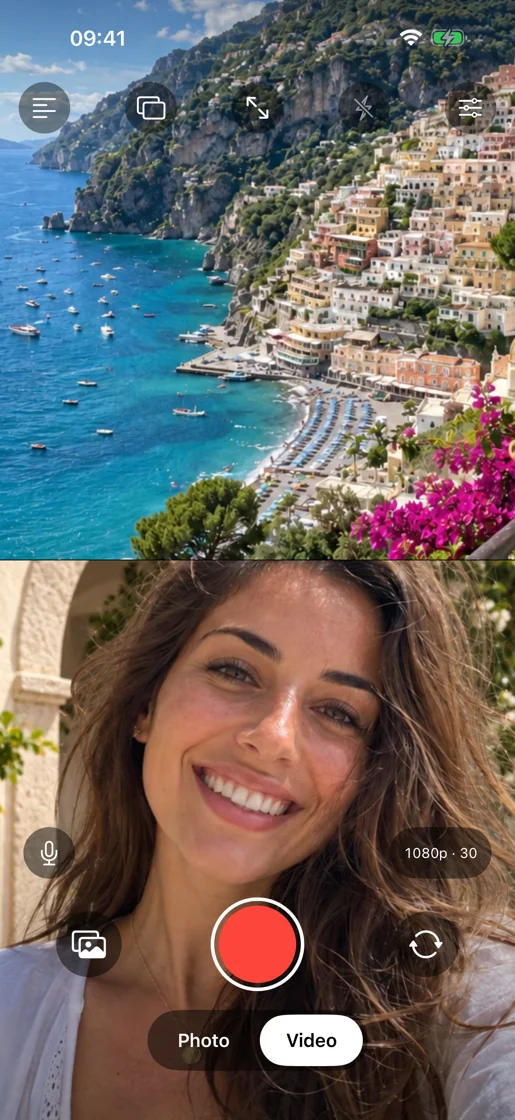
The Top / bottom layout with demonstration images. Choose what to save
In Settings, turn on Save composition. If you only want the finished clip, turn off the options to save the front and rear camera files separately.
Record and play it back
Tap the red record button. To finish, tap the square that replaces it. If you granted permission to save to Photos, open the clip there and check that you can see both views.

